JavaScript Modules (Import & Export)

While writing production ready codes, it is a known fact that it will not be going to few hundred lines.
It will include multiple variables, abundant of function definitions and their consumptions, yes?
How a code performing multiple functions may look.
const username = "John";

function calculateTax(amount) {
  return amount * 0.18;
}

function sendEmail(email) {
  console.log(`Email sent to ${email}`);
}


const tax = calculateTax(1000);
sendEmail("john@example.com");
But if you can see sendEmail is not related to calculateTax and the variables are also independent, so why are we keeping everything together?
But have you seen a production code from a senior developer? If not complete, then at least the starting 10–20 lines. If yes, then you must have seen something like:
import x from y;
import { a } from b;

export c;
export { d };
You don't understand this completely, alright, but you are familiar with it. Right?
Breaking This Down
While writing big files of code, we developers don't always write complete code from scratch in a single file. We distribute it into multiple files.
These files containing reusable code are known as Modules.
Dividing code into modules helps to maintain the code structure in a better way and maintain Separation of Concerns. That is, if two lines of code are for different purposes, then keep them in different files only.
Example
One file for function definitions only.
Another file to consume those functions.
One file reserved for API or Database calls.
Another one to render data for the user.
We borrow a huge amount of code from what others have written, or maybe what we ourselves have written in another file or folder.
We can export values or functions both.
Now let's see different types of import/export for modules.
1.) Named Export
Either export during the declaration or export later using { }.
Export from one file
// export const a = 5

const a = 5;
export { a };
Import in another file
import { a } from "file_path";
We can do multiple exports also
const a = 5;
const b = 10;

export { a, b };
Multiple Imports
import { a, b } from "file_path";

console.log(a);
console.log(b);
Sometimes we want different variable names while importing
import {
  a as firstValue,
  b as secondValue
} from "file_path";

console.log(firstValue);
console.log(secondValue);
Exporting Functions
export function double(a) {
  return a * 2;
}
or
function double(a) {
  return a * 2;
}

function thrice(a) {
  return a * 3;
}

export {
  double,
  thrice
};
2.) Default Export
Unlike named export, here we can only have one default export.
Default export example
const a = 5;

export default a;
Importing
import a from "file_path";
Importing with different names (Alias)
import firstValue from "file_path";
Unlike named exports, the imported variable name can be anything because default export has only one exported value.
3.) Export Everything
Exporting everything
export * from "./file_path";
Importing everything
import * as allValues from "./file_path";

console.log(allValues.value1)

console.log(allValues.function1(parameter))
Benefits of Modular Code
➜ Code Reusability
We write the code once in a file and now, using import/export, it can be used anywhere in the project.
➜ Easy Maintenance
Maintenance becomes so easy because the code is very well structured.
➜ Bug Fixing
Because the code is not scattered here and there, bug identification in a particular module and fixing it becomes easier compared to the all-in-one pattern.
➜ Better Separation of Concerns
Different responsibilities stay in different files, making the codebase easier to understand.
➜ Scalability
As the project grows, new features can be added without making a single file massive and difficult to manage.
➜ Team Collaboration
Different developers can work on different modules simultaneously without interfering with each other's work.
Conclusion
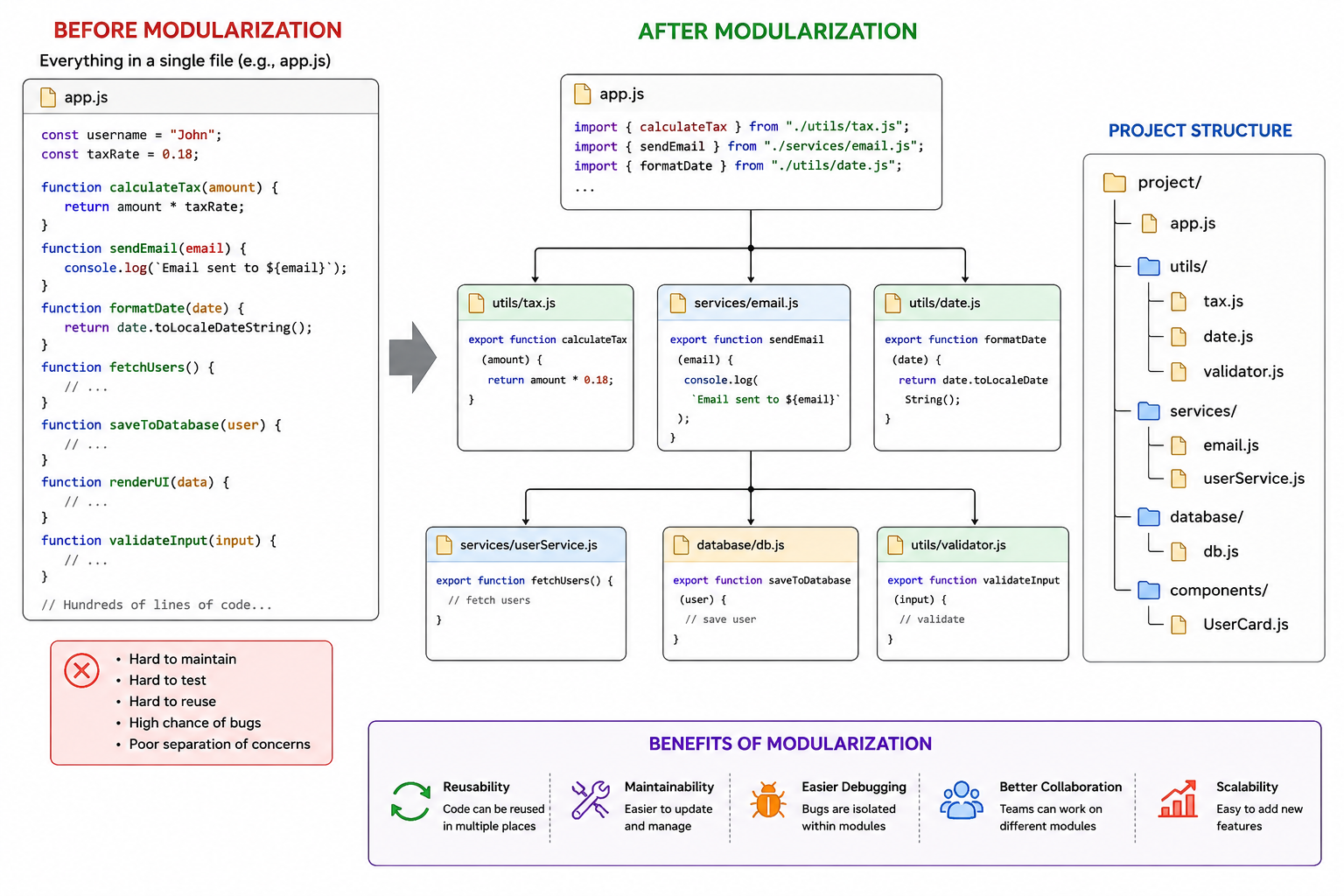
Modules are simply a way of dividing large applications into smaller reusable pieces.
Instead of writing everything in a single file, we separate concerns into multiple files and connect them using import and export.
This keeps the code:
Reusable
Maintainable
Scalable
Easy to debug
And that is why almost every production-level JavaScript codebase heavily relies on modules.


